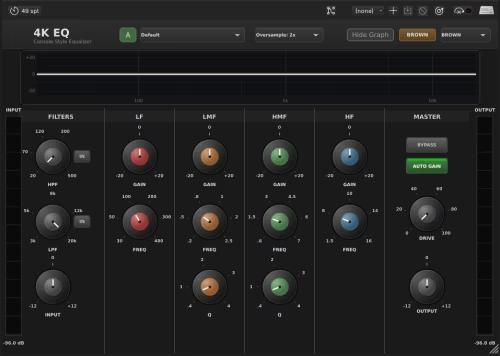
4K-EQ is a free console-style EQ plugin by Dusk Audio, available as VST3, AU and LV2. Download it from Dusk Audio's official download page to get a compact, British-console-inspired EQ for mixing and bus work; licensing is listed as free, so check the developer page for full terms.
What it is
4K-EQ is billed as a professional console EQ emulation that brings classic British mixing-console character into your DAW. 4K-EQ is useful for shaping tone on individual tracks, busses, and masters when you need that analog-style color without heavy CPU use.
Features
- Console-style coloration and band behavior (British console emulation)
- Intuitive controls for quick tonal shaping
- Lightweight CPU footprint for tracking and mixing
- Available as VST3, Audio Unit (AU) and LV2 formats
- Suitable for mixing, mastering touches, and bus processing
Formats & system requirements
- Plugin formats: VST3, Audio Unit (AU), LV2
- Platforms: Windows (VST3), macOS (VST3/AU), Linux (LV2)
- Host: any DAW that supports the plugin formats above
- Licensing: offered as a free download; verify royalty-free terms on the developer page
Quick usage tip: use 4K-EQ on a bus for gentle broad boosts/cuts to add console character, then switch to narrower Q for surgical mid-band work.
Bottom line: 4K-EQ is a free console-inspired EQ plugin from Dusk Audio, offered in VST3/AU/LV2 formats. It’s available to download from the developer’s site and is suitable for mixing and bus coloration.
Download 4K-EQ from Dusk Audio's official download page and drop it into a fresh mix to test tone shaping.
FAQ
Is 4K-EQ really free?
Yes. 4K-EQ is listed as a free download from Dusk Audio; check the developer page for the exact licensing terms.
What DAWs does 4K-EQ support?
It supports DAWs that accept VST3 (Windows/macOS), Audio Unit (macOS), and LV2 (Linux) plugin formats.
Do I need to sign up to download 4K-EQ?
Usually no trial limit is listed, but sign-up policies vary by developer—check Dusk Audio's download page for any account requirements.