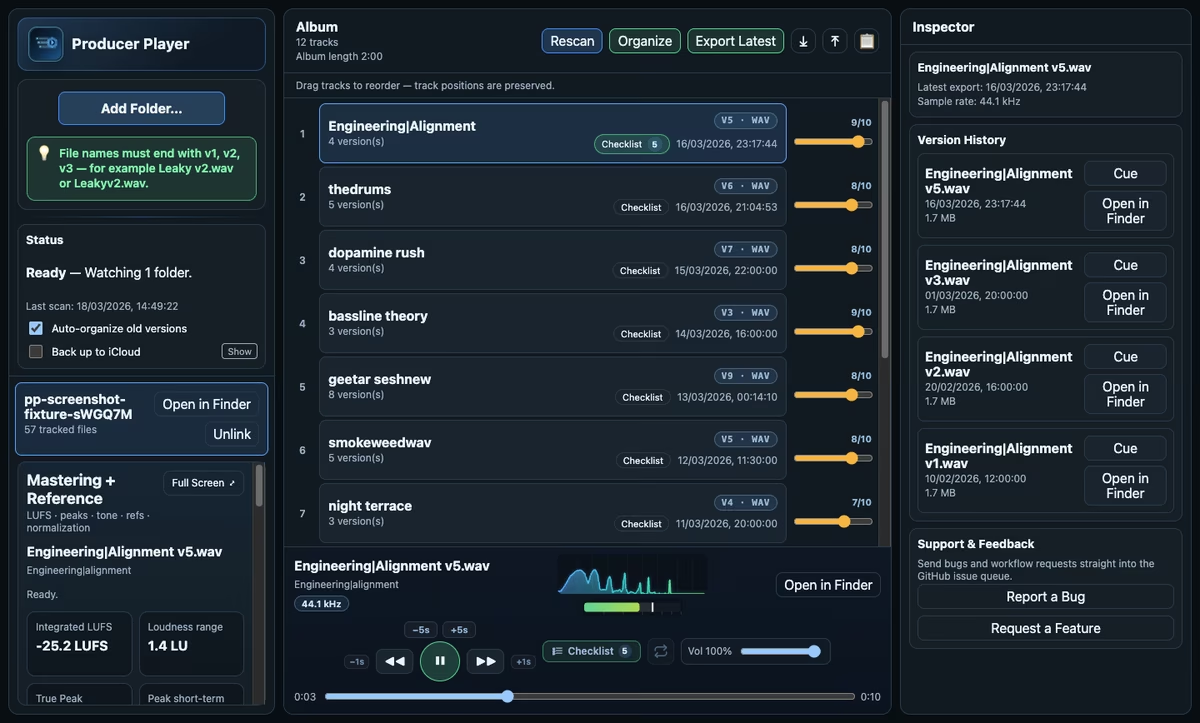
Producer Player is a free cross-platform desktop app for music producers who bounce a lot and need an organised way to manage alternate mixes, masters and album ordering. It was built and released by Ethan Sarif-Kattan and you can download it directly from the developer site: https://ethansk.github.io/producer-player.
What it is and why it matters
Producer Player centralises version tracking, a mastering workspace, and album ordering in a single window so you can preview and compare bounced versions without digging through folders. It’s built around an ordered track list with per-track version history and painless file auditioning.
Key features
- Version tracking across an ordered track list
- Mastering workspace for quick reference-level checks
- Album ordering and export-ready sequencing
- Single-window interface for quick A/B of bounces
- Lightweight cross-platform desktop app (Windows / macOS / Linux)
Specs & system requirements
- Platforms: Windows, macOS, Linux
- Download: direct from developer site (no store required)
- File handling: imports standard bounce files for auditioning
- Sign-up: no account or subscription required
Producer Player aims to solve common workflow friction for finishing tracks: naming consistency, quick previews, and keeping masters organised. Producer Player supports rapid auditioning and ordering so you can focus on decisions instead of file management.
Licensing and usage: Producer Player is free to download and use with no purchase or trial limits. For explicit license details or questions about open-source status and commercial-use terms, check the project page linked above.
Quick Facts: Producer Player is available now for Windows, macOS and Linux and is free to download from the developer site. There’s no sign-up or time limit; review the official page for full license details.
Grab Producer Player and start organising your bounced versions today.
FAQ
Is Producer Player really free?
Producer Player is free to download and use with no purchase or time-limited trial required; check the developer page for license specifics.
What OS does it support?
Producer Player supports Windows, macOS and Linux.
Do I need to sign up to use Producer Player?
No sign-up or account is required to download and run Producer Player; it’s distributed directly from the developer site.