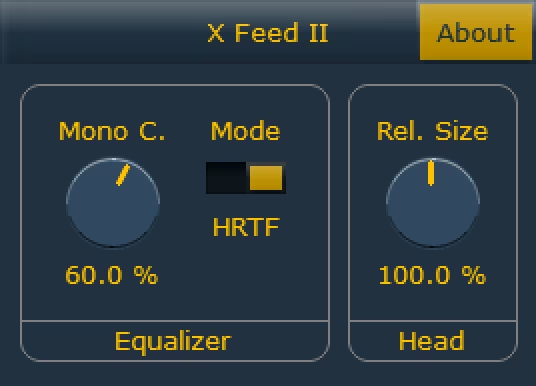
X Feed II is a free crossfeed plugin from Helmut Keller Audio that improves headphone monitoring by emulating loudspeaker crosstalk. Get X Feed II as a freeware download with no sign-up and no time limit — install the VST3/AU/CLAP build for your DAW and use it on mixes and monitoring chains.
What X Feed II does and who it's for
X Feed II is a lightweight crossfeed tool for headphone listening and stereo imaging. It reduces the “in-head” separation that headphones can create by blending left/right channels to emulate a standard speaker setup, improving perceived width and punch for mixing and casual monitoring. Producers, mixers, and mastering engineers who work on headphones will find X Feed II useful.
Key features and specs
- Crossfeed processing to emulate loudspeaker crosstalk and reduce in-head imaging
- Simple controls for crossfeed amount and output level (minimal CPU)
- Available formats: VST3, Audio Unit (AU), CLAP
- Small footprint suitable for tracking, mixing, and mastering sessions
System requirements, licensing & download notes
- OS: macOS and Windows (formats listed above)
- CPU: low usage — fits on low-powered systems and laptop sessions
- Licensing: distributed as freeware by Helmut Keller Audio; usable in your productions without royalties, but check the included license text for specifics
- Availability: no time-limited demo and no sign-up required to download X Feed II
Try X Feed II in a headphone monitoring insert to compare dry/wet and listen for a more speaker-like stereo image. Download and install the format that matches your DAW and test with mono compatibility and level-matched AB comparisons.
Grab X Feed II from Helmut Keller Audio’s distribution page and drop it on your master or monitor bus to evaluate.
Quick Facts: X Feed II is free to download and install with no signup required; formats include VST3, AU, and CLAP. The plugin is distributed as freeware by Helmut Keller Audio and is available now.
FAQ
Is X Feed II really free?
Yes. X Feed II is distributed as freeware by Helmut Keller Audio with no demo limits; check the included license for commercial-use details.
What DAWs and formats does X Feed II support?
X Feed II is available in VST3, Audio Unit (AU), and CLAP formats for Windows and macOS DAWs.
Do I need to sign up to download X Feed II?
No. The plugin is available to download without registration or time-limited trials.